


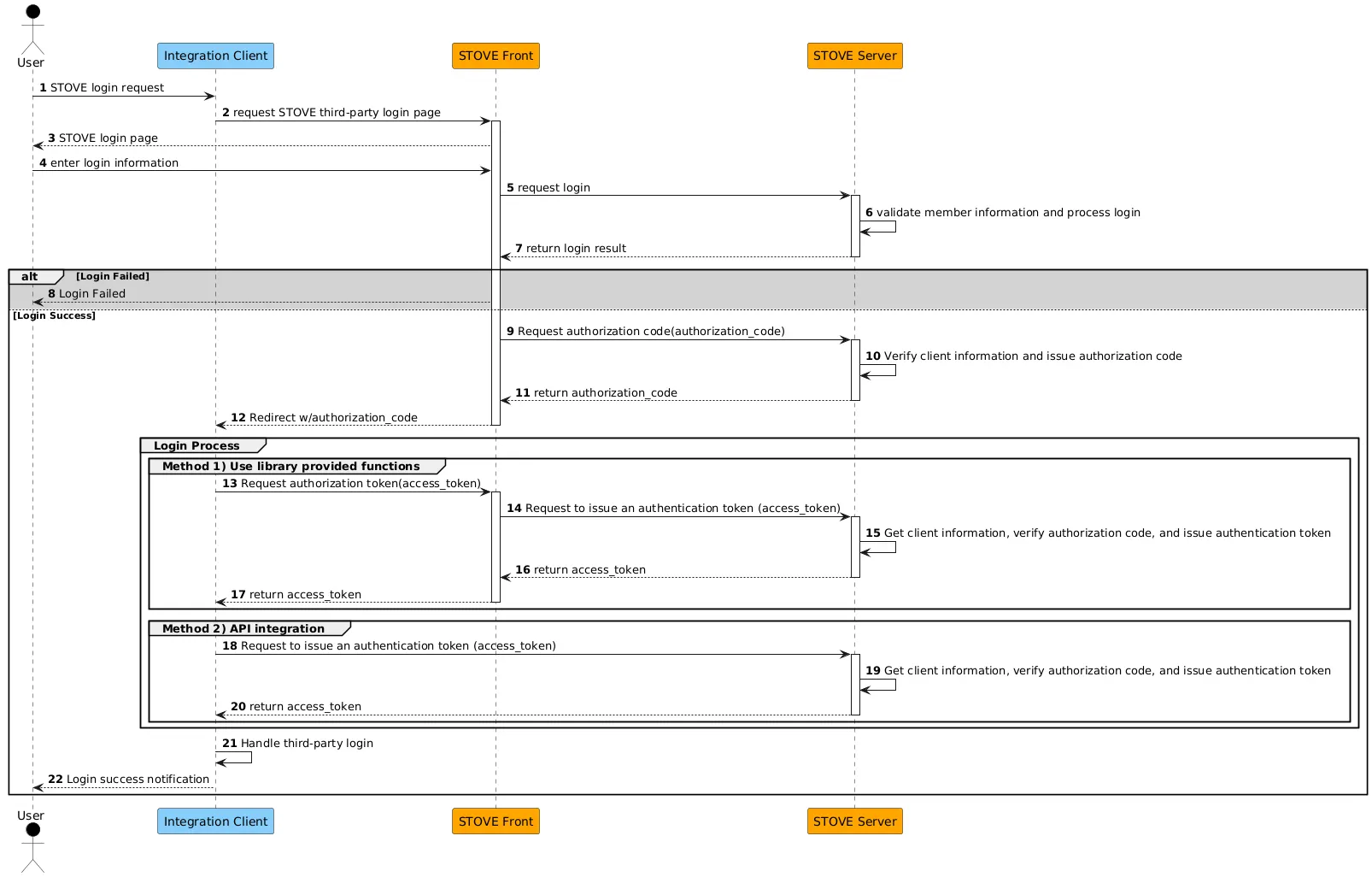
1) Integration information registration request
1-1. Register application information
Issue client_id, client_secret information and register callback information (callback url) for STOVE third-party login integration.
•
Register the relevant information with STOVE Support.
1-2. ACL registration (firewall open)
The STOVE third-party login integration requires you to allow access to the integrator's domain.
•
Register the relevant information with STOVE Support.
2) STOVE Third-Party Library Reference
Import a script library that provides STOVE third-party login functions.
•
Inside the head tag, include a script tag with the path to the stoveThirdParty library js file.
Sample
<head>
<meta charset="UTF-8">
<script src="https://static-cdn.onstove.com/0.0.1/stove-third-party-login/1.0.0/stoveThirdParty.js"></script>
</head>
JavaScript
복사
Information
Live | https://static-cdn.onstove.com/0.0.1/stove-third-party-login/1.0.0/stoveThirdParty.js |
3) Create a tag for the STOVE login popup open
Create a tag for the popup window open.
•
Configure a div tag with the id = stove_id_login attribute.
Sample
<div id="stove_id_login"></div>
JavaScript
복사
4) Create a login button
Create a login button that includes login options.
•
You can create an a tag that opens a popup by calling the StoveThirdPartyLogin.initStoveLoginPopup() function.
Sample
window.onload(() => {
const option = {
isPopup: true,
redirectUrl: 'https://example.com/login/stoveLogin',
inflowPath: 'THIRD-COMMON',
useStoveDomain: true,
runType: 'live',
clientId: 'thisistestclientid1234567890',
styleType: 'POPUP-STOVE'
};
window.StoveThirdPartyLogin.initStoveLoginPopup(option);
});
// a tag generated when calling a function
<a href="https://accounts.onstove.com/auth/login?inflow_path=THIRD-COMMON&style_type=POPUP-STOVE&redirect_url=...&client_id=..."
onclick="window.open(this.href, ...); return false">Log in with your Stove ID</a>
JavaScript
복사
Login Options Specifications
isPopup | Options for pop-up opening or page redirection
true: Pop-up opening
false: Page redirection |
redirectUrl | URL to return the authorization code upon successful login
Callback URL of the application registered on Stove |
inflowPath | Entry Service Name
THIRD-COMMON (Newly added) |
useStoveDomain | Options for pop-up domains
• true : onstove.com |
runType | Environmental Options (default : live)
• live |
clientId | Unique client_id of the application registered on Stove |
styleType | Login pop-up style
• POPUP-STOVE (fixed) |
5) Login processing (authentication token issuance)
Once the user has completed STOVE login, the authorization code is sent via redirectUrl.
The STOVE authentication token is issued using the authorization code, completing the login process.
•
Select one of the following delivery methods.
(Method 1) Using library functions
•
Obtain an authorization code using the getAuthorizationCode() function.
•
Issue a STOVE authentication token (access_token) using the stoveSign() function.
Sample
window.onload({
// Obtain authorization code from redirect URL
var code = window.StoveThirdPartyLogin.getAuthorizationCode();
// Issue Stove authentication token
const accessToken = StoveThirdPartyLogin.stoveSign(
{
client_id: ‘issued client_id’,
client_secret: ‘issued client_secret’,
code: 'received authorization_code'
},
false,
‘live’);
)};
JavaScript
복사
stoveSign() Function Specification
stoveSign(data: RequestBody, useStoveDomain: boolean = true, runType: string = 'live')
JavaScript
복사
parameter
data | Data required for token request
client_id: Unique client ID provided by Stove
client_secret: Application secret key data provided by Stove
code: Issued authorization code |
useStoveDomain | Option to specify the request API domain (default: true)
• true : onstove.com |
runType | Execution environment (default : live)
• live |
function return
code | Integer | Returns code data regarding the server's processing results. |
message | String | Returns a message corresponding to the result code. |
value | Object | See below |
key | data type | description |
access_token | String | STOVE Certified Token |
expires_in | Integer | Token validity period (milliseconds) |
(Method 2) API integration
•
Obtain the authorization code (authorization_code) received through redirectUrl.
•
Issue an STOVE authentication token (access_token) through an API call.
Sample
// request
curl --location --request POST 'https://s-api.onstove.com/sign/v1.0/oauth/token' \
--header 'Content-Type: application/json' \
--header 'caller-id: {ServiceName}' \
--data-raw '{
"grant_type": "authorization_code",
"client_id": "0fb89e7b5476b7a895d084551bbf48f39cae59770e6d78cb908e6cb913ba2fa3",
"client_secret": "ef3b9ecd34388bff70db070b10c719e6f74d75941be684704732370beeca4645bc975270b0ae50a6b8f88d67f546b8aa",
"code": "IOz57Bh3_3zdv5x3c8KPL1rHkCXw8hVUFUtRFLBlxW8bGu6T5bpNv8XOI47dqzZAehEOzgopb1QAAAGDsYXOgQ"
}'
// response
// Success
{
"code": 0,
"message": "Success",
"value": {
"access_token": "eyJhbGciOiJIUzI1NiJ9.eyJleHBpcmVfdGltZSI6MTYxOTcwNjA2OTYxMiwibWVtYmVyX25vIjoyMDAwMTQ2NDE3NSwiYXBwbGljYXRpb25fbm8iOjEwMDAyfQ._k38MtByq0w3rFQZqRQe9EGUBaeOe4fXdluG9xmWUZbkDYaj-GAIan9-ALJVY5jgUPiALD92Ks5MT91vTZXQNuwA7TEAaVk2SCQkWq3tlbSOAQ9I8iFIEEi7zlwmzA5T2Lq94H0jHTTI4WQGfFjYjFL4cSFevEuj6u6u2Rp1hqFJJbAyMUIB_4rKEuCgkTKqKQKWAYRKuFKT1I5BNPwxckxn3kw904t-5-X7c7oTcXw",
"expires_in": 21599984
}
}
// If the client_id or client_secret is incorrect
{
"code": 41001,
"message": "Invalid client id"
}
JavaScript
복사
/v1.0/oauth/token API Details
POST /v1.0/oauth/token
Host:
https://s-api.gate8.com/sign (Sandbox)
https://s-api.onstove.com/sign (LIVE)
Content-Type: application/json
JavaScript
복사
Request
Header
Name | Type | Required | Default Value | Example | Description |
Content-Type | String | Y | - | application/json | Resource media type |
caller-id | String | N | - | clientapp | API caller information |
Body
Name | Type | Required | Default Value | Example | Description |
grant_type | String | Y | - | "authorization_code" | Authorization method
Fixed to “authorization_code” |
client_id | String | Y | - | Client ID
Issued client_id | |
client_secret | String | Y | - | Client Secret
Issued client_secret | |
code | String | Y | - | Authorization code
Authorization code received through the STOVE login pop-up |
Response
Body
Name | Type | Required | Default Value | Example | Description |
code | Integer | Y | - | 0 | Response Code |
message | String | Y | - | Success | Response Message |
value | Object | N | - | {"aaa":123,"bbb":"abcd"} | response value. See below |
Name | Type | Description |
access_token | String | STOVE Certified Token |
expires_in | Integer | Token validity time (milliseconds) |
Return Code
HTTP Status code | Code | Message | Description |
200 | 0 | Success | Success |
200 | 41001 | Invalid client id | If the client ID or secret is incorrect |
200 | 41009 | Invalid authorization code | If the authorization code is invalid |